Use a customized CDK bootstrap template
Learn how to customize the AWS CDK bootstrap template to add server access logging and KMS encryption to the staging bucket. Use the CDK Toolkit library to orchestrate multi-region deployments, extract environments from CDK apps, and validate CloudFormation templates with cdk-nag.
Introduction
In some cases, the CDK bootstrap resources need changes beyond what's possible with the standard bootstrap parameters. While the CDK provides customization options, certain configurations require customizing of the template.
This post demonstrates how to:
- Encrypt the staging bucket with a custom KMS key
- Enable server access logs for the staging bucket
- Validate CloudFormation templates with cdk-nag before deployment
- Use the CDK Toolkit library to orchestrate the entire process in TypeScript
While the KMS key can be configured via bootstrap parameters, server access logging requires template customization. Since TypeScript is used for the CDK setup, all scripting will also be in TypeScript using the AWS CDK Toolkit library.
Additionally, we'll use cdk-nag to bridge the gap between CloudFormation templates and CDK validation rules.
Create the Resources for Bootstrap via CloudFormation
Before customizing the bootstrap template, we need to create supporting resources via CloudFormation:
- A KMS key for encrypting the staging bucket
- A log bucket for storing server access logs
These resources will be referenced during the bootstrap process via CloudFormation exports.
KMS Key Template
Show KMS template
AWSTemplateFormatVersion: "2010-09-09"
Description: KMS Key for encrypting the CDK bootstrap bucket
Resources:
  CdkBootstrapKmsKey:
    Type: AWS::KMS::Key
    DeletionPolicy: Retain
    UpdateReplacePolicy: Retain
    Properties:
      Description: KMS Key for CDK Bootstrap Bucket
      EnableKeyRotation: true
      KeyPolicy:
        Version: "2012-10-17"
        Statement:
          - Sid: Enable IAM User Permissions
            Effect: Allow
            Principal:
              AWS: !Sub "arn:${AWS::Partition}:iam::${AWS::AccountId}:root"
            Action: "kms:*"
            Resource: "*"
          - Sid: Allow CDK roles to use the key
            Effect: Allow
            Principal:
              AWS: !Sub "arn:${AWS::Partition}:iam::${AWS::AccountId}:root"
            Action:
              - "kms:Encrypt"
              - "kms:Decrypt"
              - "kms:ReEncrypt*"
              - "kms:GenerateDataKey*"
              - "kms:DescribeKey"
            Resource: "*"
            Condition:
              StringLike:
                "aws:PrincipalArn":
                  - !Sub "arn:${AWS::Partition}:iam::${AWS::AccountId}:role/cdk-*-cfn-exec-role-*"
                  - !Sub "arn:${AWS::Partition}:iam::${AWS::AccountId}:role/cdk-*-file-publishing-role-*"
                  - !Sub "arn:${AWS::Partition}:iam::${AWS::AccountId}:role/cdk-*-image-publishing-role-*"
                  - !Sub "arn:${AWS::Partition}:iam::${AWS::AccountId}:role/cdk-*-lookup-role-*"
                  - !Sub "arn:${AWS::Partition}:iam::${AWS::AccountId}:role/cdk-*-deploy-role-*"
                "kms:ViaService":
                  - !Sub "s3.${AWS::Region}.amazonaws.com"
                  - !Sub "ecr.${AWS::Region}.amazonaws.com"
              ArnLike:
                "kms:EncryptionContext:aws:s3:arn":
                  - !Sub "arn:${AWS::Partition}:s3:::cdk-*-assets-${AWS::AccountId}-${AWS::Region}/*"
                "kms:EncryptionContext:aws:ecr:arn":
                  - !Sub "arn:${AWS::Partition}:ecr:${AWS::Region}:${AWS::AccountId}:repository/cdk-*-container-assets-*"
  CdkBootstrapKmsKeyAlias:
    Type: AWS::KMS::Alias
    Properties:
      AliasName: alias/cdk-bootstrap-key
      TargetKeyId: !Ref CdkBootstrapKmsKey
Outputs:
  CdkBootstrapKmsKeyId:
    Value: !Ref CdkBootstrapKmsKey
    Description: ID of the KMS key for CDK bootstrap
    Export:
      Name: cdk-bootstrap-kms-key-id
S3 Log Bucket Template
Show S3 log bucket template
AWSTemplateFormatVersion: "2010-09-09"
Description: "CloudFormation template for S3 log bucket with encryption and lifecycle policies"

Resources:
  LogBucket:
    Type: AWS::S3::Bucket
    Properties:
      VersioningConfiguration:
        Status: Enabled
      BucketEncryption:
        ServerSideEncryptionConfiguration:
          - ServerSideEncryptionByDefault:
              SSEAlgorithm: AES256
      PublicAccessBlockConfiguration:
        BlockPublicAcls: true
        BlockPublicPolicy: true
        IgnorePublicAcls: true
        RestrictPublicBuckets: true
      LifecycleConfiguration:
        Rules:
          - Id: DeleteLogsAfterRetention
            Status: Enabled
            ExpirationInDays: 90
          - Id: DeleteOldVersions
            Status: Enabled
            NoncurrentVersionExpiration:
              NoncurrentDays: 30
      Tags:
        - Key: Purpose
          Value: ApplicationLogs
        - Key: Environment
          Value: Bootstrap

  LogBucketPolicy:
    Type: AWS::S3::BucketPolicy
    Properties:
      Bucket: !Ref LogBucket
      PolicyDocument:
        Version: "2012-10-17"
        Statement:
          # AWS Best Practice: Restrict log delivery to buckets in the same account
          # See: https://docs.aws.amazon.com/AmazonS3/latest/userguide/enable-server-access-logging.html
          - Sid: AllowS3LogDeliveryWrite
            Effect: Allow
            Principal:
              Service: logging.s3.amazonaws.com
            Action: s3:PutObject
            Resource: !Sub "${LogBucket.Arn}/*"
            Condition:
              # Restrict to buckets in the same account
              StringEquals:
                aws:SourceAccount: !Ref AWS::AccountId
          - Sid: AllowS3LogDeliveryAclCheck
            Effect: Allow
            Principal:
              Service: logging.s3.amazonaws.com
            Action: s3:GetBucketAcl
            Resource: !GetAtt LogBucket.Arn
          # Note: DenyUnencryptedObjectUploads removed per AWS best practices
          # Bucket default encryption (SSE-S3) ensures all objects are encrypted
          # The S3 logging service doesn't set explicit encryption headers
          - Sid: DenyInsecureTransport
            Effect: Deny
            Principal: "*"
            Action: s3:*
            Resource:
              - !GetAtt LogBucket.Arn
              - !Sub "${LogBucket.Arn}/*"
            Condition:
              Bool:
                aws:SecureTransport: "false"

Outputs:
  LogBucketName:
    Description: Name of the log bucket
    Value: !Ref LogBucket
    Export:
      Name: log-bucket-name
The Deployment Script
A CDK app can have stacks deployed to different regions. Each region needs to be bootstrapped, so the KMS key and log bucket must be created in every region.
Using the CDK Toolkit library, we can extract the regions from the CDK app and deploy the CloudFormation templates accordingly.
The script creates CloudFormation outputs to make the resource values retrievable during bootstrap.
Show deploy script
import * as fs from "node:fs";
import * as path from "node:path";
import {
  CloudFormationClient,
  CreateStackCommand,
  type CreateStackCommandInput,
  UpdateStackCommand,
  type UpdateStackCommandInput,
  type Tag,
} from "@aws-sdk/client-cloudformation";
import { Toolkit } from "@aws-cdk/toolkit-lib";

// Parse command line arguments
const args = process.argv.slice(2);
const DRY_RUN = args.includes("--dry-run");

interface TemplateConfig {
  filename: string;
  stackName: string;
  description: string;
}

const getRegions = async (): Promise<string[]> => {
  const toolkit = new Toolkit();
  const appPath = path.join(globalThis._importMeta_.dirname, "../../bin/app.ts");
  const cloudAssemblySource = await toolkit.fromCdkApp(`pnpx tsx ${appPath}`);

  const cloudAssembly = await toolkit.synth(cloudAssemblySource);
  const list = await toolkit.list(cloudAssembly);
  const regions = list.map((stack) => stack.environment.region);
  return regions;
};

const templates: TemplateConfig[] = [
  {
    filename: "bootstrap-kms-key.yaml",
    stackName: "cdk-bootstrap-kms-key",
    description: "KMS Key for encrypting the CDK bootstrap bucket",
  },
  {
    filename: "log-bucket.yaml",
    stackName: "cdk-bootstrap-log-bucket",
    description: "S3 log bucket with encryption and lifecycle policies",
  },
];

// Tags to apply to all stacks
const commonTags: Tag[] = [
  { Key: "Environment", Value: "bootstrap" },
  { Key: "ManagedBy", Value: "cdk-bootstrap" },
  { Key: "Purpose", Value: "cdk-deployment" },
];

async function loadTemplateContent(templatePath: string): Promise<string> {
  try {
    const content = fs.readFileSync(templatePath, "utf-8");
    console.log(`✓ Loaded template: ${templatePath}`);
    return content;
  } catch (error) {
    console.error(`✗ Failed to load template: ${templatePath}`);
    throw error;
  }
}

async function deployOrUpdateStack(
  config: TemplateConfig,
  templateContent: string,
  region: string,
): Promise<string> {
  const cfClient = new CloudFormationClient({ region });

  if (DRY_RUN) {
    console.log(`✓ [DRY RUN] Would deploy/update stack`);
    return "dry-run-stack-id";
  }

  // Try to update first
  try {
    const updateParams: UpdateStackCommandInput = {
      StackName: config.stackName,
      TemplateBody: templateContent,
      Tags: commonTags,
    };

    const updateCommand = new UpdateStackCommand(updateParams);
    const response = await cfClient.send(updateCommand);
    console.log(`✓ Stack updated`);
    return response.StackId!;
  } catch (error: any) {
    // If stack doesn't exist, create it
    if (error.message?.includes("does not exist")) {
      const createParams: CreateStackCommandInput = {
        StackName: config.stackName,
        TemplateBody: templateContent,
        Tags: commonTags,
        OnFailure: "DELETE",
        TimeoutInMinutes: 10,
        EnableTerminationProtection: true,
      };

      const createCommand = new CreateStackCommand(createParams);
      const response = await cfClient.send(createCommand);
      console.log(`✓ Stack created`);
      return response.StackId!;
    }

    // If no changes are detected during update, it's still successful
    if (error.message?.includes("No updates are to be performed")) {
      console.log(`✓ Stack is up to date (no changes needed)`);
      return "";
    }

    throw error;
  }
}

async function deployTemplate(
  config: TemplateConfig,
  templatePath: string,
  region: string,
): Promise<void> {
  try {
    const templateContent = await loadTemplateContent(templatePath);

    console.log(`\n📦 Deploying stack: ${config.stackName} to ${region}`);
    const stackId = await deployOrUpdateStack(config, templateContent, region);

    if (stackId) {
      console.log(`  Stack ID: ${stackId}`);
    }
  } catch (error: any) {
    console.error(`✗ Failed to deploy stack ${config.stackName}:`);
    console.error(`  ${error.message}`);
    throw error;
  }
}

async function main(): Promise<void> {
  const cfTemplatesDir = path.join(globalThis._importMeta_.dirname, "../cf-templates");
  const regions = await getRegions();

  console.log("🚀 Starting CloudFormation template deployment...\n");
  if (DRY_RUN) {
    console.log("⚠️  DRY RUN MODE - No actual changes will be made\n");
  }
  console.log(`Template directory: ${cfTemplatesDir}`);
  console.log(`Regions: ${regions.join(", ")}\n`);

  try {
    for (const region of regions) {
      console.log(`\n🌍 Deploying to region: ${region}`);

      for (const template of templates) {
        const templatePath = path.join(cfTemplatesDir, template.filename);
        await deployTemplate(template, templatePath, region);
      }
    }

    if (DRY_RUN) {
      console.log("\n✅ Dry run completed successfully! No changes were made.");
    } else {
      console.log("\n✅ All templates deployed successfully!");
    }
  } catch (error) {
    console.error("\n❌ Deployment failed");
    process.exit(1);
  }
}

main();
Validate CloudFormation Templates with cdk-nag
Resources within a CDK app can be validated with cdk-nag. To validate CloudFormation templates outside the CDK app, we can create a helper app that applies the same rule set to our CloudFormation templates.
As described in the cdk-nag documentation, CloudFormation templates can be included via the CfnInclude construct and validated using cdk-nag aspects.
This approach ensures:
- The same validation rules are applied consistently
- The same suppression mechanisms can be used
- All infrastructure code follows the same security standards
Run the validation with this command:
pnpm exec tsx bootstrap/app.tsShow cdk-nag validation script
import { CfnInclude } from "aws-cdk-lib/cloudformation-include";
import { Stack, StackProps } from "aws-cdk-lib";
import { Toolkit } from "@aws-cdk/toolkit-lib";
import { App, Aspects } from "aws-cdk-lib";
import { AwsSolutionsChecks, NagSuppressions } from "cdk-nag";

// Set region and avoid IMDS lookup for local checks
process.env.AWS_REGION = process.env.AWS_REGION || "us-east-1";
process.env.AWS_SDK_LOAD_CONFIG = "false"; // Prevent credential lookup
process.env.AWS_EC2_METADATA_SERVICE_ENDPOINT_MODE = "IPv4"; // Prevent IMDS timeout

const toolkit = new Toolkit();

const cloudAssemblySource = await toolkit.fromAssemblyBuilder(async () => {
  const app = new App();
  const stack = new Stack(app, "CdkNagCheckStack");
  new CfnInclude(stack, "BootstrapKmsKey", {
    templateFile: "./bootstrap/cf-templates/bootstrap-kms-key.yaml",
  });
  const logBucket = new CfnInclude(stack, "LogBucket", {
    templateFile: "./bootstrap/cf-templates/log-bucket.yaml",
  });
  NagSuppressions.addResourceSuppressions(
    logBucket,
    [
      {
        id: "AwsSolutions-S1",
        reason: "Log bucket does not have server access logs enabled",
      },
    ],
    true,
  );

  Aspects.of(app).add(new AwsSolutionsChecks({ verbose: true }));
  return app.synth();
});

try {
  await toolkit.synth(cloudAssemblySource);
  console.log("\n✓ Bootstrap templates synthesized successfully");
} catch (error) {
  console.error("\n✗ CDK Nag violations or synthesis errors found:");
  console.error(error);
  process.exit(1);
}
Create the Customized CDK Bootstrap Template
Get the Default Template
Customizations should be based on the standard CDK bootstrap template to ensure all necessary resources are included and the process remains compatible with future CDK versions. First, retrieve the default template using the CDK CLI.
Since the Toolkit library doesn't provide functionality to retrieve the standard template, we use the CDK CLI via a child process.
Show script to get default template
import { execSync } from "node:child_process";
import { mkdirSync, writeFileSync } from "node:fs";
import { join } from "node:path";
import { CDK_STANDDARD_TEMPLATE_FILE_NAME } from "./bootstrap";

const resultCdkStandardTemplate = execSync("pnpm exec cdk bootstrap --show-template", {
  encoding: "utf8",
});

const generatedDir = join(globalThis._importMeta_.dirname, "..", "generated");
mkdirSync(generatedDir, { recursive: true });

writeFileSync(join(generatedDir, CDK_STANDDARD_TEMPLATE_FILE_NAME), resultCdkStandardTemplate);
Customize the Template
Using a YAML parser, the standard template is loaded and modified to add the logging configuration to the staging bucket.
The log bucket configuration is embedded into the template using the CloudFormation Fn::ImportValue function, which references the log bucket created earlier. This approach is necessary because there's no way to pass the log bucket name as a parameter during the bootstrap process itself.
Show template customization script
import { mkdirSync, readFileSync, writeFileSync } from "node:fs";
import { join } from "node:path";
import { parse, stringify } from "yaml";
import { CDK_CUSTOMIZED_TEMPLATE_FILE_NAME, CDK_STANDDARD_TEMPLATE_FILE_NAME } from "./bootstrap";

const cdkStandardTemplate = readFileSync(
  join(globalThis._importMeta_.dirname, "..", "generated", CDK_STANDDARD_TEMPLATE_FILE_NAME),
  {
    encoding: "utf8",
  },
);

const cdkBootstrapTemplate = parse(cdkStandardTemplate);
if (!cdkBootstrapTemplate) {
  throw new Error("Failed to load cdk bootstrap template");
}

// Add LoggingConfiguration to StagingBucket using Fn::ImportValue
if (cdkBootstrapTemplate.Resources?.StagingBucket?.Properties) {
  cdkBootstrapTemplate.Resources.StagingBucket.Properties.LoggingConfiguration = {
    DestinationBucketName: { "Fn::ImportValue": "log-bucket-name" },
    LogFilePrefix: "staging-bucket-logs/",
  };
}

const generatedDir = join(globalThis._importMeta_.dirname, "..", "generated");
mkdirSync(generatedDir, { recursive: true });

writeFileSync(
  join(generatedDir, CDK_CUSTOMIZED_TEMPLATE_FILE_NAME),
  stringify(cdkBootstrapTemplate),
);
Bootstrap with the Customized Template
Finally, execute the CDK bootstrap process with the customized template using the Toolkit library.
Since the KMS key was created via CloudFormation, its ID must be retrieved using the CloudFormation Stack Outputs. The script:
- Extracts environments (account/region pairs) from the CDK app
- Retrieves the KMS key ID for each region from CloudFormation outputs
- Passes the KMS key ID as a parameter to the bootstrap process
Note that the log bucket configuration is already embedded in the customized template via Fn::ImportValue, while the KMS key ID is passed as a parameter.
Show bootstrap script
import { BootstrapEnvironments, BootstrapStackParameters, Toolkit } from "@aws-cdk/toolkit-lib";
import { CloudFormationClient, DescribeStacksCommand } from "@aws-sdk/client-cloudformation";
import path from "node:path";
import { join } from "node:path";

export const CDK_STANDDARD_TEMPLATE_FILE_NAME = "resultCdkStandardTemplate.yaml";
export const CDK_CUSTOMIZED_TEMPLATE_FILE_NAME = "resultCdkCustomizedTemplate.yaml";

const toolkit = new Toolkit();

const templateFilePath = join(
  globalThis._importMeta_.dirname,
  "..",
  "generated",
  "resultCdkCustomizedTemplate.yaml",
);

const appPath = path.join(globalThis._importMeta_.dirname, "../../bin/app.ts");

const cloudAssemblySource = await toolkit.fromCdkApp(`pnpx tsx ${appPath}`);
// const environments: BootstrapEnvironments =
//   BootstrapEnvironments.fromCloudAssemblySource(cloudAssemblySource);
const cloudAssembly = await toolkit.synth(cloudAssemblySource);
const list = await toolkit.list(cloudAssembly);
const environmentsFromApp = list.map((stack) => {
  return {
    account: stack.environment.account,
    region: stack.environment.region,
  };
});

for (const environmentFromApp of environmentsFromApp) {
  // Get KMS Key ID from stack output
  const cfnClient = new CloudFormationClient({
    region: environmentFromApp.region,
  });
  const describeStacksResponse = await cfnClient.send(
    new DescribeStacksCommand({
      StackName: "cdk-bootstrap-kms-key",
    }),
  );

  const kmsKeyOutput = describeStacksResponse.Stacks?.[0]?.Outputs?.find(
    (output) => output.ExportName === "cdk-bootstrap-kms-key-id",
  );

  const kmsKeyId = kmsKeyOutput?.OutputValue;

  const environments: BootstrapEnvironments = BootstrapEnvironments.fromList([
    `aws://${environmentFromApp.account}/${environmentFromApp.region}`,
  ]);
  console.log(
    `Bootstrapping environment ${environmentFromApp.account}/${environmentFromApp.region} with KMS Key ID: ${kmsKeyId}`,
  );
  await toolkit.bootstrap(environments, {
    parameters: {
      parameters: {
        kmsKeyId,
      },
      keepExistingParameters: true,
    },
    source: {
      source: "custom",
      templateFile: templateFilePath,
    },
  });
}
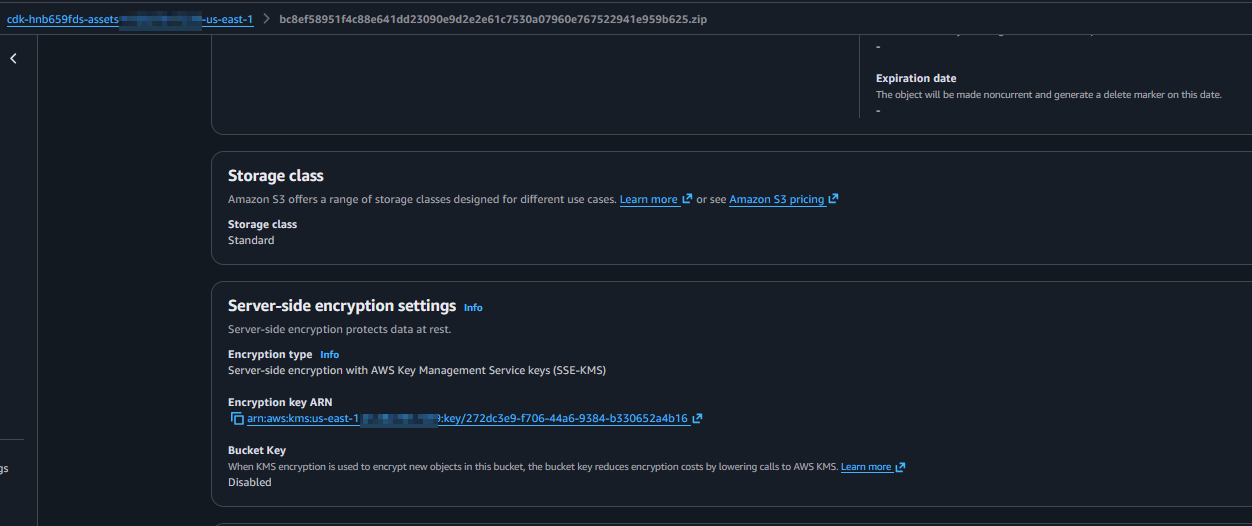
After executing this script, the staging bucket will have:
Custom KMS encryption:
Server access logging configuration:

Conclusion
With a customized CDK bootstrap template, you can extend the bootstrap resources beyond what's possible with standard parameters. The CDK Toolkit library is an excellent tool for orchestrating the entire workflow in TypeScript, from extracting environments to deploying customized bootstrap stacks.
This approach enables:
- Advanced security configurations like custom KMS encryption and access logging
- Consistent validation using cdk-nag across both CDK and CloudFormation resources
- Type-safe, programmatic control over the bootstrap process
- Multi-region deployments with region-specific resource management