Feature-stack databases and Drizzle migrations on shared Aurora
Each workload stage gets its own PostgreSQL database on the account-level Aurora cluster. A custom resource creates it through the Data API, and Drizzle applies the same migrations on deploy and from the laptop.
Introduction
Aurora sits at account level. Every workload stage shares that one cluster: long-lived stages and short-lived feature deployments. The cluster is Data API only, so a workload stack cannot open a connection and create a database itself. Each stage still needs its own PostgreSQL database. A permanent stage keeps that database when the stack is deleted. A feature stage drops it with the stack.
In tanstack-aws, account setup owns the cluster and publishes the cluster ARN, secret ARN, and maintenance database name in SSM. Each workload stage then gets a stage database on that cluster. A branch named feature/checkout becomes stage feature-checkout and database feature_checkout. Person tables live in schema default inside it. The screen that reads those tables is the Aurora persons demo.
Where the database lives
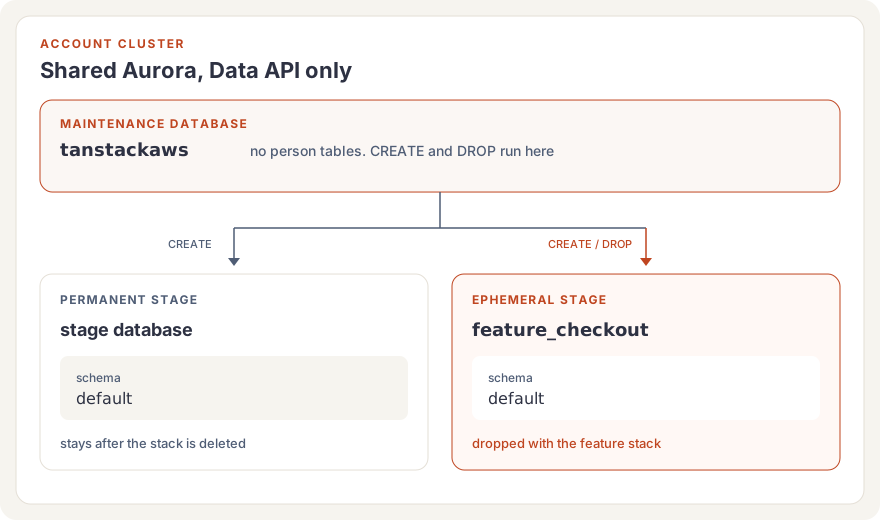
The maintenance database is tanstackaws. It holds no person tables. CREATE DATABASE and DROP DATABASE run there, each as its own auto-commit Data API call. SSM parameter /tanstack-aws/shared/aurora/database-name stores the name. Account setup writes it when it creates the cluster with DatabaseName: tanstackaws and the HTTP endpoint enabled.
resolveStageDatabaseName turns the stage into the database name. Hyphens become underscores, so stage feature-checkout is database feature_checkout. STAGE_DATABASE_SCHEMA is default in every stage database. The stage name and the schema name stay different identifiers.
A schema per stage inside tanstackaws would put every feature stack in the same database as the permanent stages, and the schema name would follow the stage. A database per stage keeps schema default stable.
What a deploy does
SharedWorkloadData reads the three SSM parameters, names the stage database from appStage, and registers StageDatabaseLifecycle. dropDatabaseOnDelete is true only when resolveStageLifecycle returns ephemeral. A permanent stage leaves its database in place.
In tanstack-aws, a feature pull request deploys with lifecycle ephemeral. Branch feature/checkout deploys TanstackAwsStack-feature-checkout. Merging the pull request destroys that stack, and the Delete drops feature_checkout.
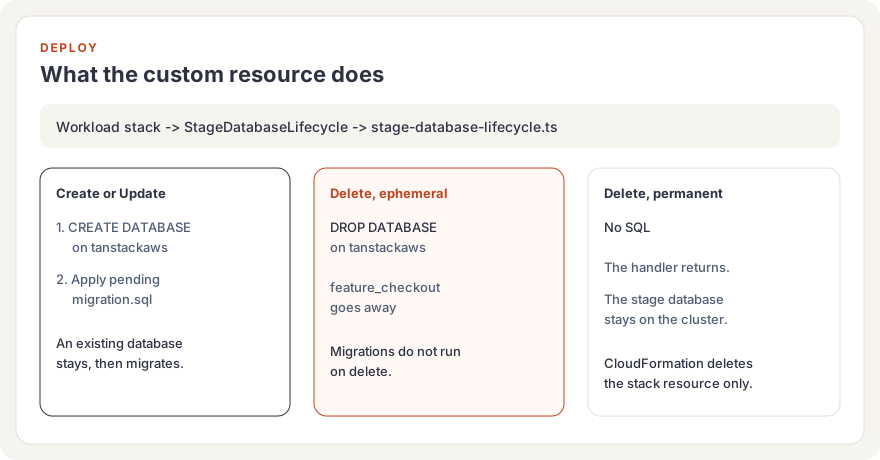
The custom resource handler is stage-database-lifecycle.ts. Bundling copies packages/aurora/migrations into the Lambda. The handler calls applyStageDatabaseLifecycle.
| Custom resource event | What the lifecycle does |
|---|---|
| Create or Update | CREATE DATABASE on tanstackaws, then apply pending migrations to the stage database. "Already exists" is ignored, and the migration still runs. |
| Delete, ephemeral stage | DROP DATABASE IF EXISTS for that stage database. For feature/checkout that is feature_checkout. Migrations do not run. |
| Delete, permanent stage | Return without SQL. The stage database stays. |
migrationsHash is a SHA-256 of every migration.sql in that folder, passed as a custom resource property. A new or edited migration changes the hash, so the next deploy invokes the handler again. A snapshot-only edit does not.
Aurora Serverless can answer resuming after being auto-paused. withAuroraResumeRetry retries that error four times, 30 seconds apart. Any other error fails immediately. The local create-and-migrate command uses the same helper.
How the SQL gets there
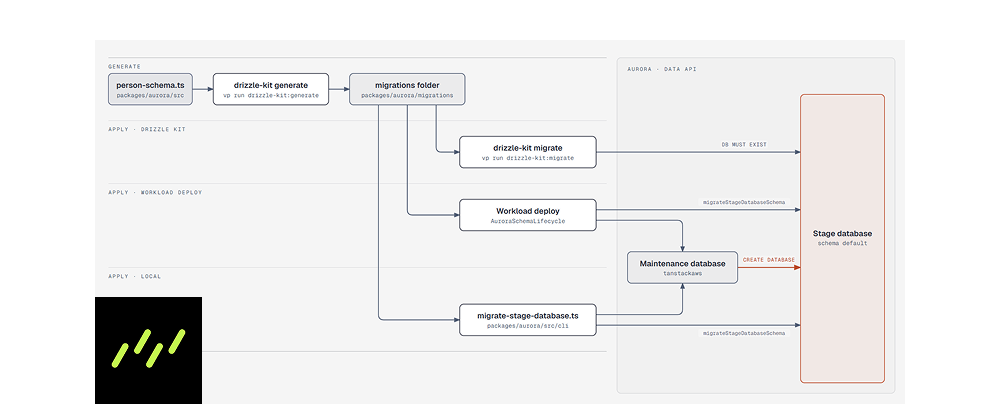
person-schema.ts is the schema source. vp run drizzle-kit:generate writes one folder per migration under packages/aurora/migrations, each with migration.sql and snapshot.json. There is no meta/_journal.json. The first migration creates schema default and the person tables inside it.
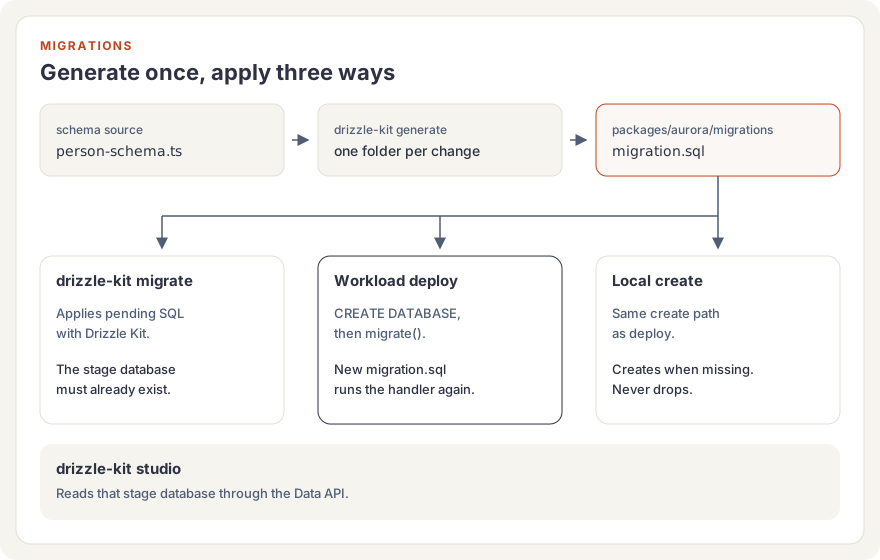
These commands read the deployed workload stack through resolveWorkloadStack. APP_STAGE selects a stack other than the current git branch. Branch feature/checkout selects TanstackAwsStack-feature-checkout and database feature_checkout.
| Task | Command | Effect |
|---|---|---|
| Generate | vp run drizzle-kit:generate | Write a migration folder from the person schema. |
| Migrate | vp run drizzle-kit:migrate | Apply pending SQL with Drizzle Kit. The stage database must already exist. |
| Create and migrate | vp exec tsx packages/aurora/src/cli/migrate-stage-database.ts | Create the stage database when it is missing, then apply migrations. It never drops a database. |
| Studio | vp run drizzle-kit:studio | Open Drizzle Studio against the stage database. |
| Seed | vp run db-aurora:seed | Insert 100 persons with addresses, contacts, bank accounts, and employments. Existing rows with those ids stay. |
drizzle.config.ts sets driver: 'aws-data-api'. The Drizzle Kit CLI fills AURORA_CLUSTER_ARN, AURORA_DATABASE_NAME, AURORA_SECRET_ARN, and AWS_REGION from the stack outputs before Kit starts. AURORA_DATABASE_NAME is the stage database, so Kit migrates and Studio inspects that database.
Deploy uses a different entry to the same SQL. After CREATE DATABASE, migrateStageDatabaseSchema calls Drizzle's RDS Data API migrate() with the folder bundled into the Lambda. migrate-stage-database.ts follows that Create path locally: it reads the maintenance database name from SSM, creates the stage database when it is missing, and calls the same migrator. The request type is Create and dropDatabaseOnDelete is false, so the command cannot drop a database.
Checking the data
vp run drizzle-kit:studio opens Drizzle Studio on the stage database through the Data API. On branch feature/checkout that database is feature_checkout. Set APP_STAGE to inspect a different deployed stage. The workload stack has to be deployed already, because Studio reads its Aurora outputs.
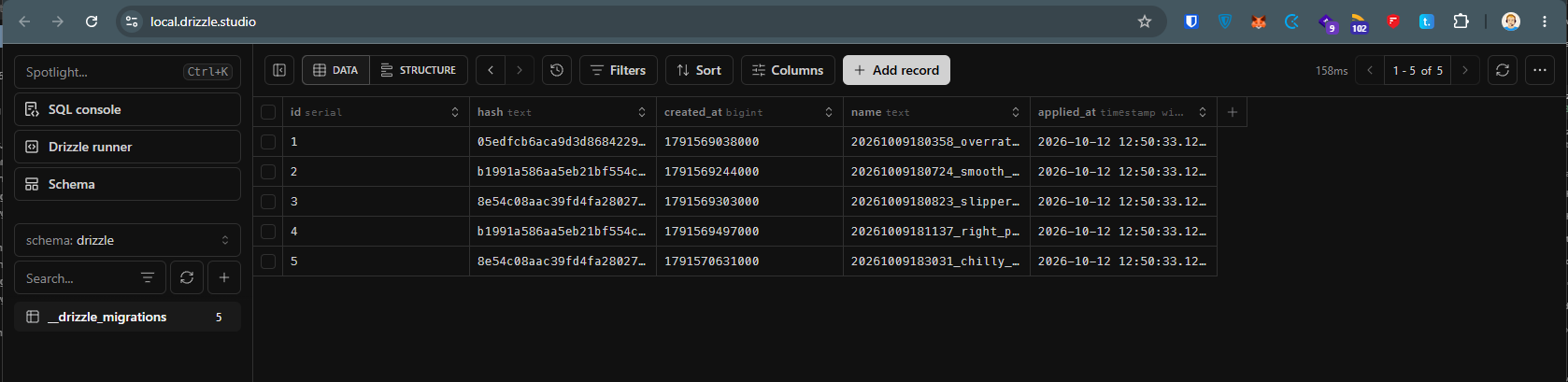
Applied migrations show up in schema drizzle, in __drizzle_migrations. Each row is one migration.sql the migrator has run.
Person tables live in schema default. persons is the table the screen reads. Addresses, contacts, bank accounts, and employments sit beside it.
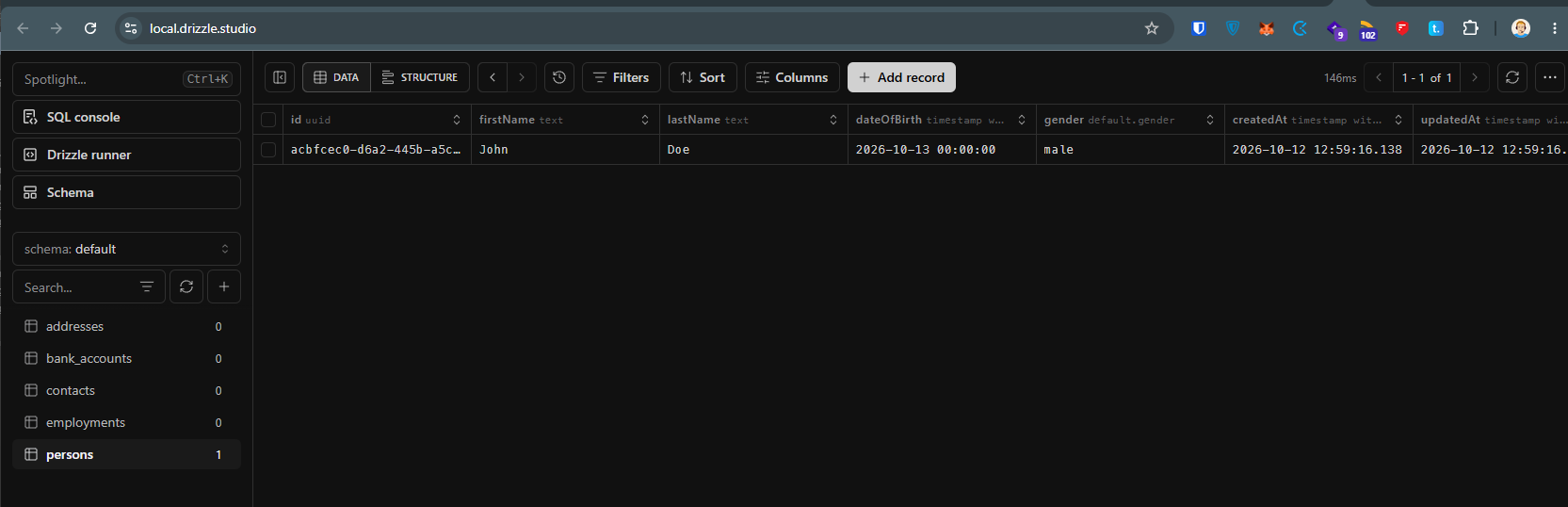
Seed inserts a fixed set of persons and related rows with onConflictDoNothing, so running it again leaves existing ids in place. Studio is where those rows show up after the seed, or after a deploy has applied a new migration.sql.
Conclusion
The account owns one Aurora cluster. Each stage owns a database on it. Deploy creates that database from tanstackaws, applies the Drizzle SQL, and drops the database only when the stage is ephemeral. The same SQL is what you generate locally, apply with Drizzle Kit once the database exists, or apply with the deploy migrator after creating it. Studio reads the result through the Data API.